Recurring General Journals in Business Central: Rent, Accruals and Reversals
How recurring general journals work in Business Central: recurring methods, recurring frequency, expiration dates and reversal dates, with a monthly rent line and an electricity accrual that reverses the next day.
Some journal entries come back every month with the same accounts and often the same amount: rent, subscriptions, insurance, a month-end accrual for a bill that hasn’t arrived yet. Typing them in every month is slow and easy to get wrong. A recurring general journal lets you set them up once and post them again and again.
This post explains the fields that make a journal recurring, then posts two entries in a CRONUS UK company on Business Central 29.1: a fixed monthly rent and an electricity accrual that reverses itself the next day.
What a recurring journal is
A recurring journal is a general journal with a few extra fields. The difference is what happens after you post. In a normal general journal, posted lines are deleted. In a recurring journal, the lines stay. The accounts, descriptions and dimensions remain, and the posting date moves forward to the next period, ready for next time.
Search for Recurring General Journals to open one. The extra fields are Recurring Method, Recurring Frequency, Expiration Date and, if you add it, Reverse Date Calculation (Microsoft Learn calls it Reversal Date Calculation).
Recurring Method
Recurring Method decides what happens to the line’s amount after posting, and whether a reversal is posted.
| Method | What happens after posting |
|---|---|
| F Fixed | The amount stays on the line. Lines with an amount of zero stay in the journal but aren’t posted |
| V Variable | The amount is deleted. You enter a new one next time |
| B Balance | The balance on the line’s account is allocated to the accounts on the Allocations page, and the account is set to zero |
| RF Reversing Fixed | Like Fixed, plus a reversing entry the next day |
| RV Reversing Variable | Like Variable, plus a reversing entry the next day |
| RB Reversing Balance | Like Balance, plus a reversing entry the next day |
| BD Balance by Dimension | Allocates a G/L account’s balance by dimension. You set dimension filters to say which part of the balance to allocate |
| RBD Reversing Balance by Dimension | Like Balance by Dimension, plus a reversing entry |
The pattern is simple. Fixed, Variable and Balance decide what happens to the amount. The R versions add a reversal.
Use Fixed when the amount is the same every time, like rent. Use Variable when the accounts are the same but the amount changes, like an electricity bill. Use a reversing method for accruals: you book the cost at month end, and the reversal clears it at the start of the next month, so the real invoice doesn’t double-count it.
Recurring Frequency
Recurring Frequency is a date formula, and it’s required. After each posting, Business Central adds it to the line’s Posting Date to get the next one.
| Formula | Meaning | From 30-11-2026 gives |
|---|---|---|
| 1M | Same day next month | 30-12-2026 |
| 1D+1M-1D | Last day of next month, if you start on a month end | 31-12-2026 |
| 1M+CM | One month, then to the end of that month | 31-12-2026 |
| CM | End of the current month | 30-11-2026 |
Watch the first row. 1M keeps the day of the month, so a line started on 30 November posts on 30 December, not 31 December. If the entry must land on the last day of every month, use 1D+1M-1D (start on a month end) or 1M+CM (start on any day). CM on its own doesn’t move a month-end date forward, so it’s not a useful frequency for a line that’s already on the last day.
Expiration Date
Expiration Date is the last date the line can be posted. After that, the line isn’t posted, but it isn’t deleted either, so you can extend the date and use it again. Leave it blank and the line posts every time until you delete it.
Set it to the end of a contract. A lease that ends on 31-12-2027 gets an expiration date of 31-12-2027, and nobody has to remember to stop posting the rent.
Reversal Date Calculation
For the reversing methods, the reversing entry is posted the next day by default. Reverse Date Calculation changes that:
| Value | Reversal is posted on |
|---|---|
| Blank | The day after the posting date |
| A date formula, for example 5D | The posting date plus that formula |
The field is hidden by default. To use it, personalize the Recurring General Journals page and add the field to the lines.
Allocations
The Allocations action on a line lets you split its amount across several accounts or dimension values, using an Allocation % on each allocation line. The allocation acts as the balancing side of the recurring line. A typical use is rent split by department, by floor space. Allocations stay in place after posting, just like the journal lines.
You need allocations for the Balance methods, since they spread an account’s balance. This post doesn’t use them.
Set up the journal
The scenario: post November’s office rent, and accrue November’s electricity because the bill won’t arrive until December.
One thing surprised me. In this version the Recurring General Journals page has no Bal. Account Type or Bal. Account No. columns, and they aren’t hidden columns you can add back. So each entry needs its own balancing line, with the same document number so the two lines post as one transaction. Two entries make four lines:


| Field | Office rent (2 lines) | Electricity accrual (2 lines) |
|---|---|---|
| Recurring Method | F Fixed | RV Reversing Variable |
| Recurring Frequency | 1M | 1M |
| Posting Date | 30-11-2026 | 29-11-2026 |
| Document No. | RENT-2611 | ACCR-2611 |
| Account No. | 30110 Rent / Leases: 2,000.00 78400 Other bank accounts: -2,000.00 | 30220 Electricity for Property: 350.00 86700 Other Accrued Expenses and Deferred Income: -350.00 |
| Expiration Date | 31-12-2027 | Blank |
| Reverse Date Calculation | Not used | Blank, so it reverses the next day |
The rent is the same every month, so it’s Fixed. The electricity accrual is an estimate that changes every month, and it has to come off again once the real bill is posted, so it’s Reversing Variable. The balancing line of each pair uses the same method, so it behaves the same way: the rent’s bank line keeps its amount, and the accrual’s liability line is cleared and reversed too.
Two practical notes:
- Clear Gen. Posting Type. Account 30220 has Gen. Posting Type Purchase on the account card, so the line picked it up. On a pure G/L accrual you don’t want VAT, so I cleared it on the line.
- The accrual is dated 29-11, so the reversal lands on 30-11. In a real company you’d usually accrue on the last day of the month and let the reversal post on the 1st. The mechanics are the same either way: the reversal is always the posting date plus one day, unless Reverse Date Calculation says otherwise. Make sure that reversal date is also inside your allowed posting dates (Allow Posting From / Allow Posting To in General Ledger Setup or User Setup), or the whole journal won’t post.
Choose Post and confirm. Business Central says The journal lines were successfully posted.
After posting: the journal
The lines are still there:


| Lines | Amount after posting | Next posting date |
|---|---|---|
| Office rent (F) | 2,000.00 / -2,000.00, unchanged | 30-12-2026 |
| Electricity accrual (RV) | 0.00, cleared | 29-12-2026 |
All four lines moved forward by 1M. The rent lines are ready to post again as they are. The electricity lines need next month’s estimate first. A line with a zero amount stays in the journal but isn’t posted.
Note the date: 30-12-2026, not 31-12-2026, because of how 1M works. If you want December’s rent on the 31st, set the posting date to 31-12-2026 by hand now, and change the frequency to 1D+1M-1D so it stays on the last day from then on.
After posting: the G/L entries
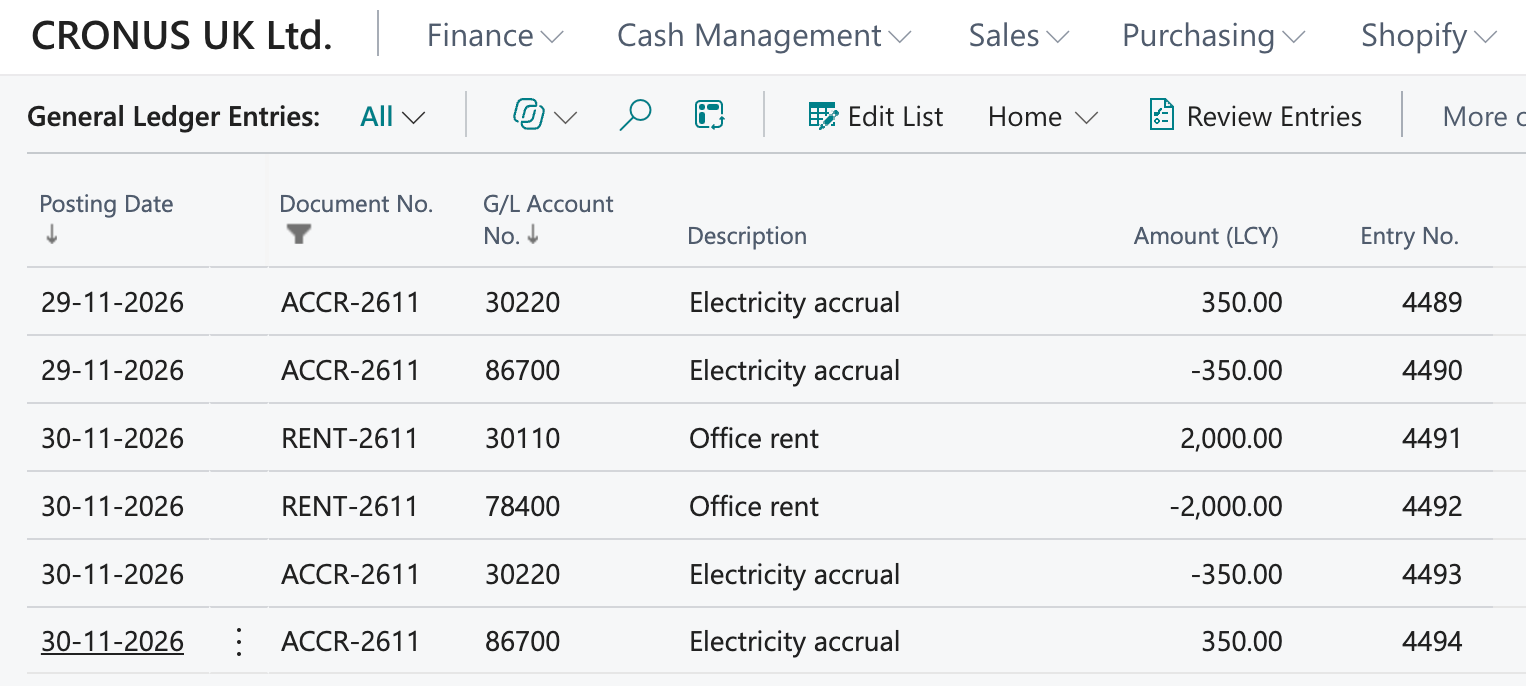
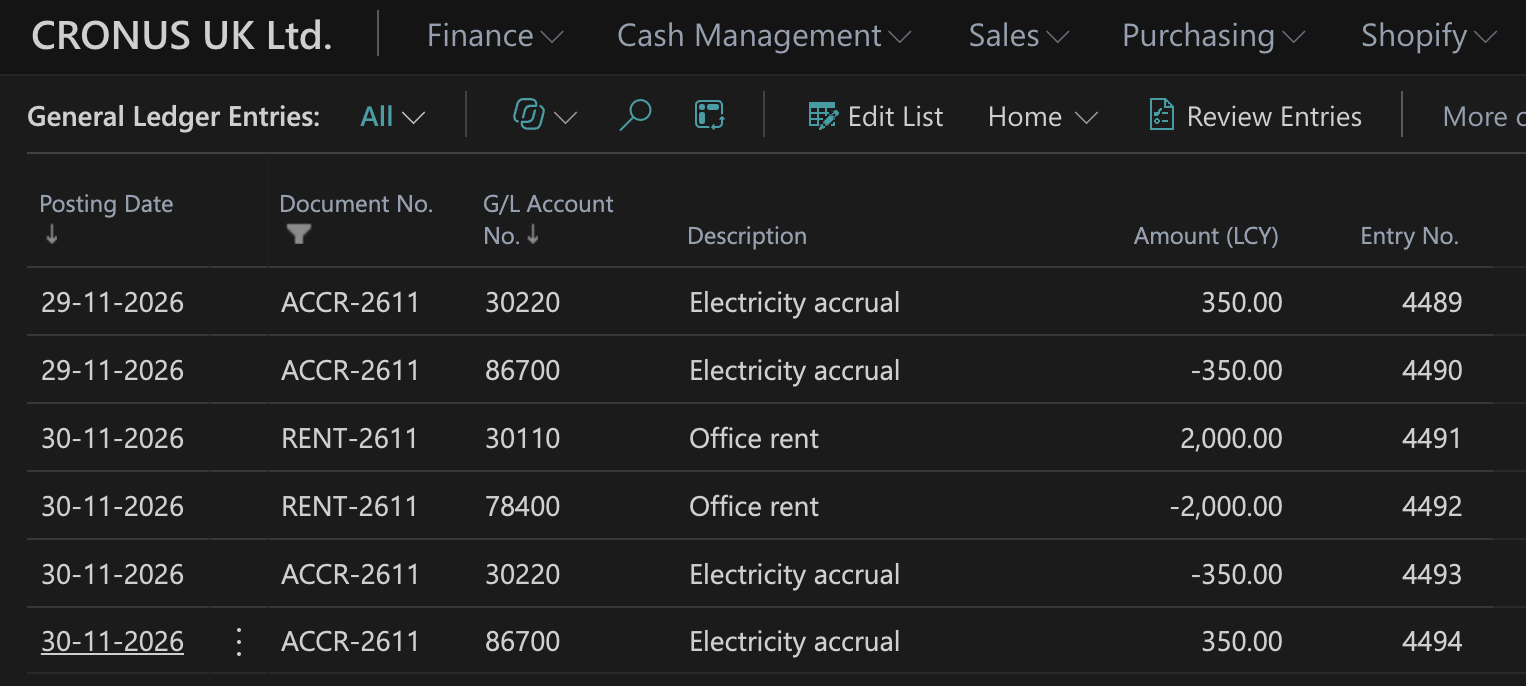
Search for General Ledger Entries and filter Document No. on RENT-2611|ACCR-2611:
| Entry | Posting Date | G/L Account | Debit | Credit | What it is |
|---|---|---|---|---|---|
| 4489 | 29-11-2026 | 30220 Electricity for Property | 350.00 | November electricity, accrued | |
| 4490 | 29-11-2026 | 86700 Other Accrued Expenses | 350.00 | Liability for the unbilled electricity | |
| 4491 | 30-11-2026 | 30110 Rent / Leases | 2,000.00 | November rent | |
| 4492 | 30-11-2026 | 78400 Other bank accounts | 2,000.00 | Paid from the bank | |
| 4493 | 30-11-2026 | 30220 Electricity for Property | 350.00 | Accrual reversed | |
| 4494 | 30-11-2026 | 86700 Other Accrued Expenses | 350.00 | Accrual reversed |
The rent is two entries, like any journal posting. The accrual is four: the accrual itself, and the reversal the next day that Business Central posted by itself, under the same document number.
With a month-end accrual posted on the 30th and reversed on the 1st, November’s income statement carries the 350.00 of electricity even though the bill hasn’t arrived. The reversal on the 1st puts a 350.00 credit on utilities at the start of December. When the real bill is posted in December, say for 362.00, it lands on utilities expense and the net cost in December is only the 12.00 difference. The accruals account is back to zero.
Summary
| You want to | Use |
|---|---|
| Post the same amount every month | F Fixed |
| Post to the same accounts with a new amount each time | V Variable |
| Accrue a cost and clear it the next day | RV Reversing Variable or RF Reversing Fixed |
| Clear an account and spread it to others | B Balance with Allocations |
| Spread a balance by dimension | BD or RBD |
| Post on the same day each month | Frequency 1M |
| Post on the last day of each month | Frequency 1D+1M-1D or 1M+CM |
| Stop posting at the end of a contract | Expiration Date |
| Reverse on a day other than the next | Reverse Date Calculation (add it via personalization) |