Where Does Non-Deductible VAT Post? The Non-Deductible Purchase VAT Account in Business Central
How the Non-Deductible Purchase VAT Account field on VAT Posting Setup decides whether non-deductible VAT lands on the purchase account or on a separate G/L account.
Business Central has supported non-deductible and partly deductible VAT as standard since the 2023 release wave 1 (v22.1). Once the feature is on, one small field on the VAT Posting Setup page decides where the non-deductible part of the VAT ends up in the general ledger: Non-Deductible Purchase VAT Account.
The rule is short:
- Field left blank: the non-deductible VAT is posted to the same account as the purchase line. It becomes part of the expense (or the item, fixed asset or project cost).
- Field filled in: the non-deductible VAT is posted to the G/L account you entered, as a separate entry.
Below is the same purchase invoice previewed both ways.
Setup used for the example
- On VAT Setup, turn on Enable Non-Deductible VAT.
- On VAT Posting Setup, for the DOMESTIC / SERVICES combination:
- VAT % = 5
- Allow Non-Deductible VAT = Allow
- Non-Deductible VAT % = 100
- Create a purchase invoice with one G/L Account line: account 52.17 Misc expenses, amount 2,000.00.
VAT is 2,000 × 5% = 100. Because the non-deductible percentage is 100, none of it is recoverable, so nothing goes to the normal Purchase VAT Account. The whole 100 is non-deductible, and the only question is which account receives it.
Case 1: Non-Deductible Purchase VAT Account is blank

| G/L Account | Description | Amount (LCY) |
|---|---|---|
| 52.17 | Misc expenses | 2,000.00 |
| 52.17 | Misc expenses | 100.00 |
| 20.1 | Invoice PI-1262 | -2,100.00 |
The 100 of VAT lands on 52.17, the account on the purchase line. The expense account now carries 2,100 in total, which is the real cost to the business when the VAT can’t be reclaimed.
Notice the second 52.17 entry has no Gen. Posting Type or posting groups. That’s how you can tell it apart from the base amount when you look at the ledger later.
Case 2: Non-Deductible Purchase VAT Account is filled in
Here the field is set to 11.6.
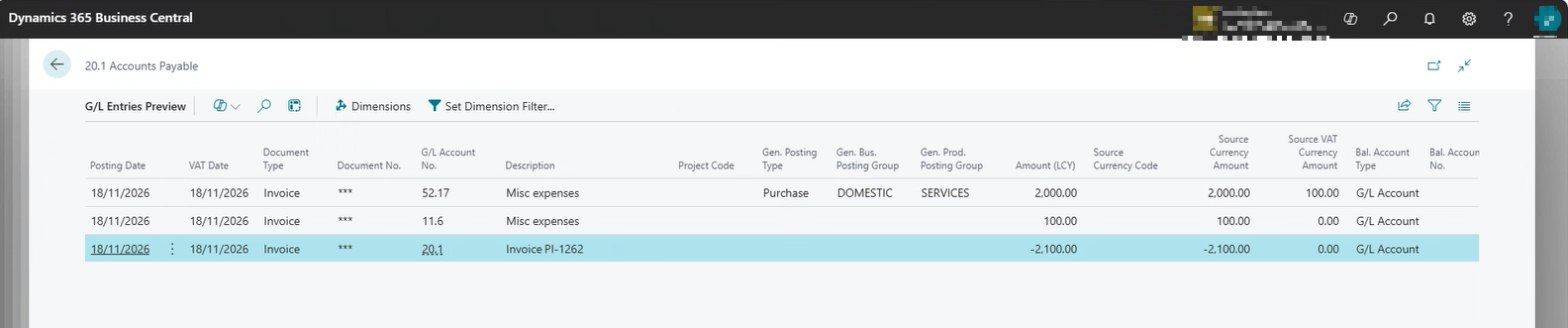
| G/L Account | Description | Amount (LCY) |
|---|---|---|
| 52.17 | Misc expenses | 2,000.00 |
| 11.6 | Misc expenses | 100.00 |
| 20.1 | Invoice PI-1262 | -2,100.00 |
The base amount still goes to 52.17, but the 100 of VAT moves to 11.6. The description on that entry still reads “Misc expenses” because Business Central copies it from the purchase line, not from the G/L account name, so don’t rely on the description to identify the VAT entry. Check the account number.
The vendor entry (20.1 Accounts Payable) is 2,100 in both cases. The field only changes the debit side.
Which one should you use?
Leave it blank when you want non-deductible VAT treated as part of the cost of what was bought. Expense reports by account show the true cost, and for items, fixed assets and projects the VAT flows into their cost as well (subject to the related options on the VAT Setup page).
Fill it in when you want non-deductible VAT in one place, for example to report it separately, reconcile it against the VAT return, or follow a chart of accounts that expects irrecoverable VAT on its own line. The trade-off is that the expense accounts then show only the net amount.
Whichever you pick, check it per VAT Posting Setup combination. The field sits on each row, so two combinations can behave differently, and a blank on one row is easy to miss.
Quick reference
| Non-Deductible Purchase VAT Account | Where the non-deductible VAT posts |
|---|---|
| Blank | Same account as the purchase line (expense, item, FA or project cost) |
| Filled in | The G/L account entered in the field |